Skip to content

HABIT AND GOAL TRACKER

Gather your day in one calm place.

Habits, journal, budget and focus, all together. It doesn't rush you or shame you. It makes today visible and leaves the decisions to you.

Download for iPhoneApp StoreGoogle Play: Coming soon

No ads. Already have an account? You can also log in on the web.

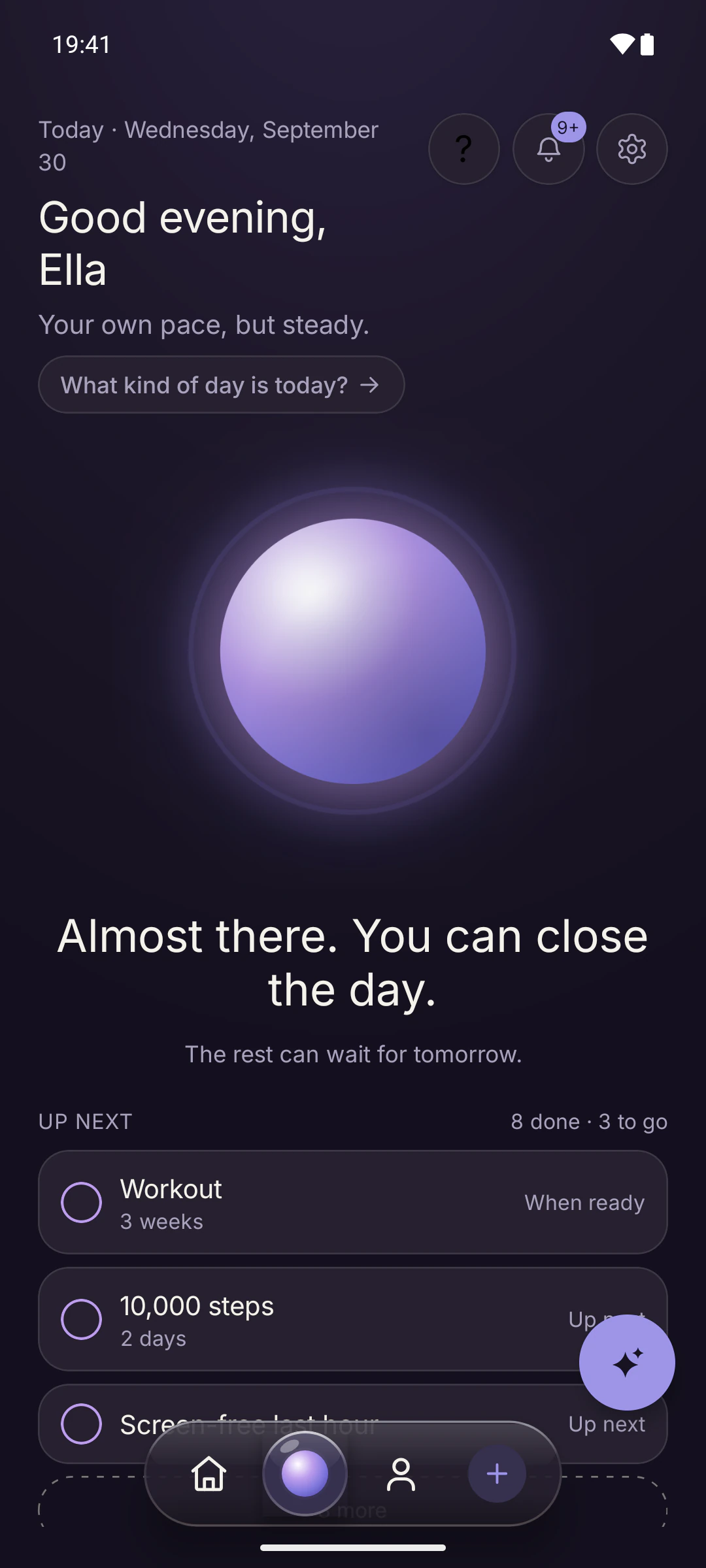
Telos Today screen: a glowing violet light in the middle, the greeting “Good evening, Ella” at the top, “Almost there. You can close the day.” below it, and the habits up next.

PRINCIPLES

What Telos doesn't do matters too.

Telos doesn't make money from ads. So it has no reason to keep you on the screen.

  • Ad-free.

    No ads, no advertising ID, no third-party analytics watching what you do.

  • No endless feed.

    Nothing grows longer as you scroll. You open it, check in, and close it.

  • No guilt.

    Missing a day doesn't erase your effort. No notifications that shame you.

  • Stored in the EU.

    Your data is stored in Ireland. It's never sold or rented.

TODAY

The light grows as your day fills.

The light on your home screen brightens as the things you do add up. You choose which modules you see, their order, and which ones to hide.

  1. Morning

    A short check-in: what's on today, how's your energy.

  2. During the day

    You see what's next in one list.

  3. Evening

    “Almost there. You can close the day.”

Habits: Streaks without the guilt.

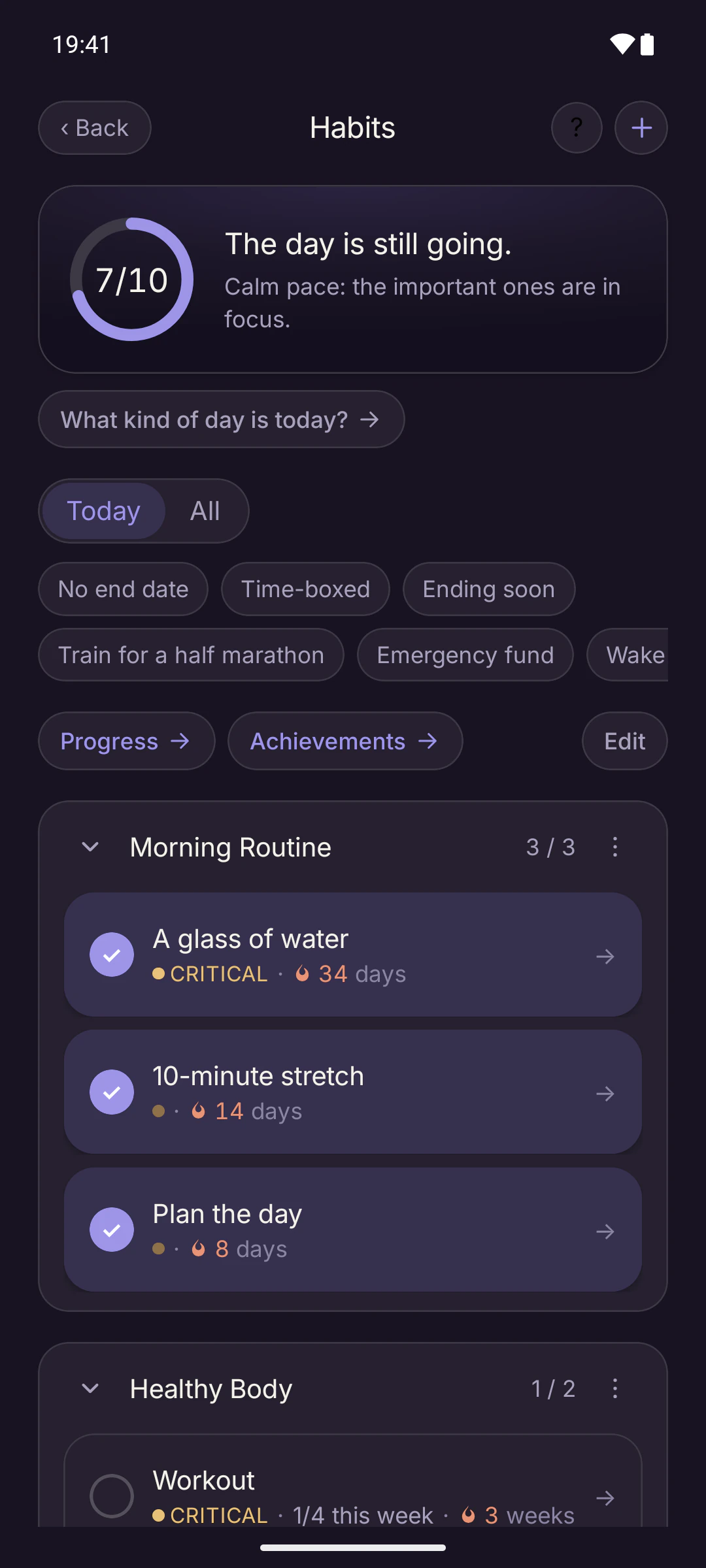
Every day, a few times a week, or on set days. Group your habits, set reminders and keep an eye on your streak.

  • Missing a day doesn't wipe everything. The streak stones you've earned stay put.
  • On a low-energy day, the less important habits quietly step back.
  • Sleep, exercise, reading, a morning routine: more than 40 ready-made packs.
Habits screen: a “7/10, the day is still going” ring, the Morning Routine group with “A glass of water”, “10-minute stretch” and “Plan the day”, each showing its streak.
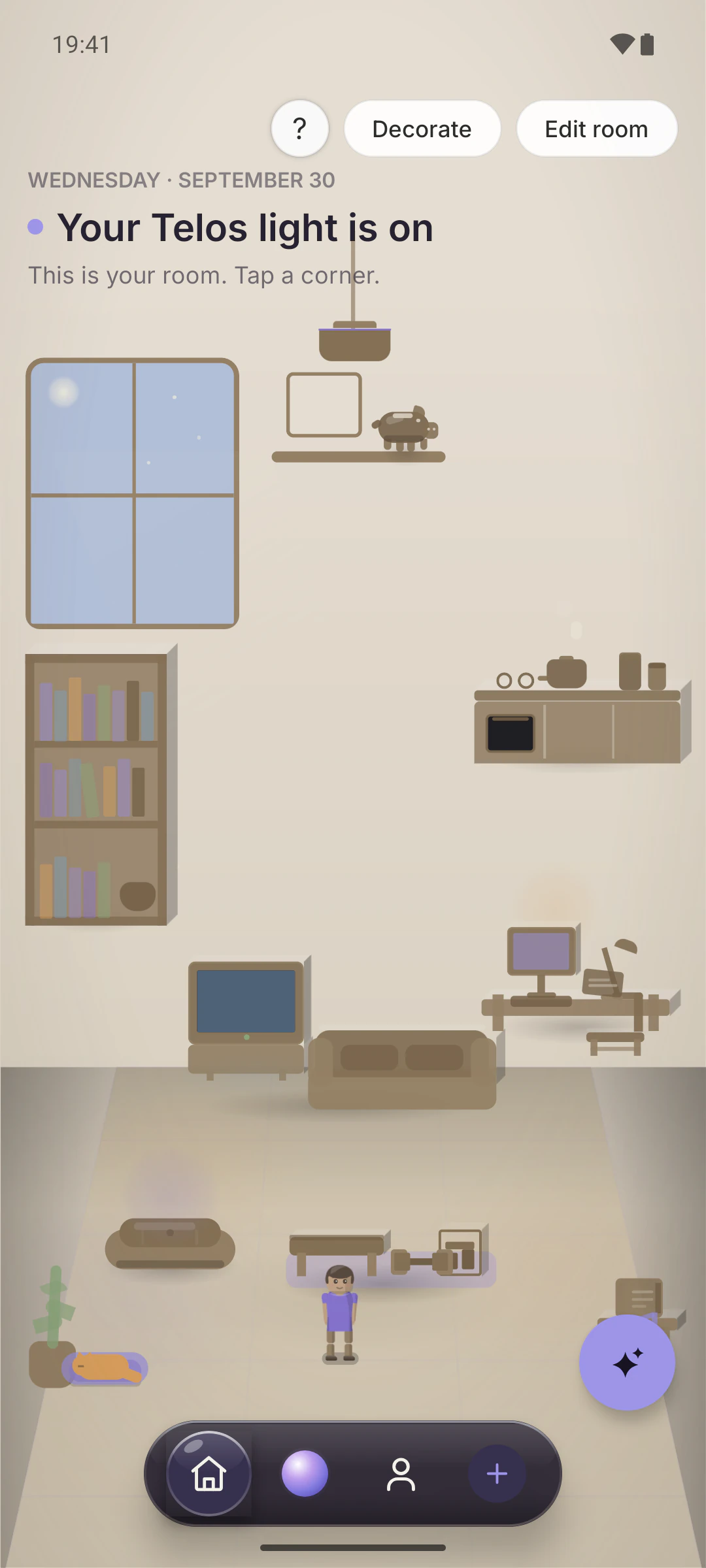
Your room screen: a warm, cream-toned illustrated room with a window, bookshelf, kitchen counter, TV, desk and a small avatar standing in the middle.

Your room: A corner for every part of life.

Inside the app there's a small room that feels alive. Tap an object and you step into that part of your life. Move things around and decorate it as you like.

  • Spending: Income, spending, categories, savings and statement analysis.
  • Plan: Projects, tasks, subtasks and dates.
  • Fitness: 860+ illustrated exercises, a weekly program and a workout log.
  • Diet: Meal log, water, calories and macros, recipes, barcode.
  • Journal: Notes, photos and voice recordings.
  • Mind: Breathing and settling down.
  • Lists: Films, series, anime and games.
  • Reading: Books, manga and your progress.

FROM YOUR ROOM

Numbers, without the pressure.

Telos shows the numbers; you decide what to change.

Diet: Calories and macros from a photo.

Type your meal or take a photo, and Telos estimates the calories and macros for you. Water, recipes and barcode scanning live here too.

  • No targets are imposed. You write your own daily goal.
  • Estimating from text or a photo is an AI feature that starts with a few free tries.
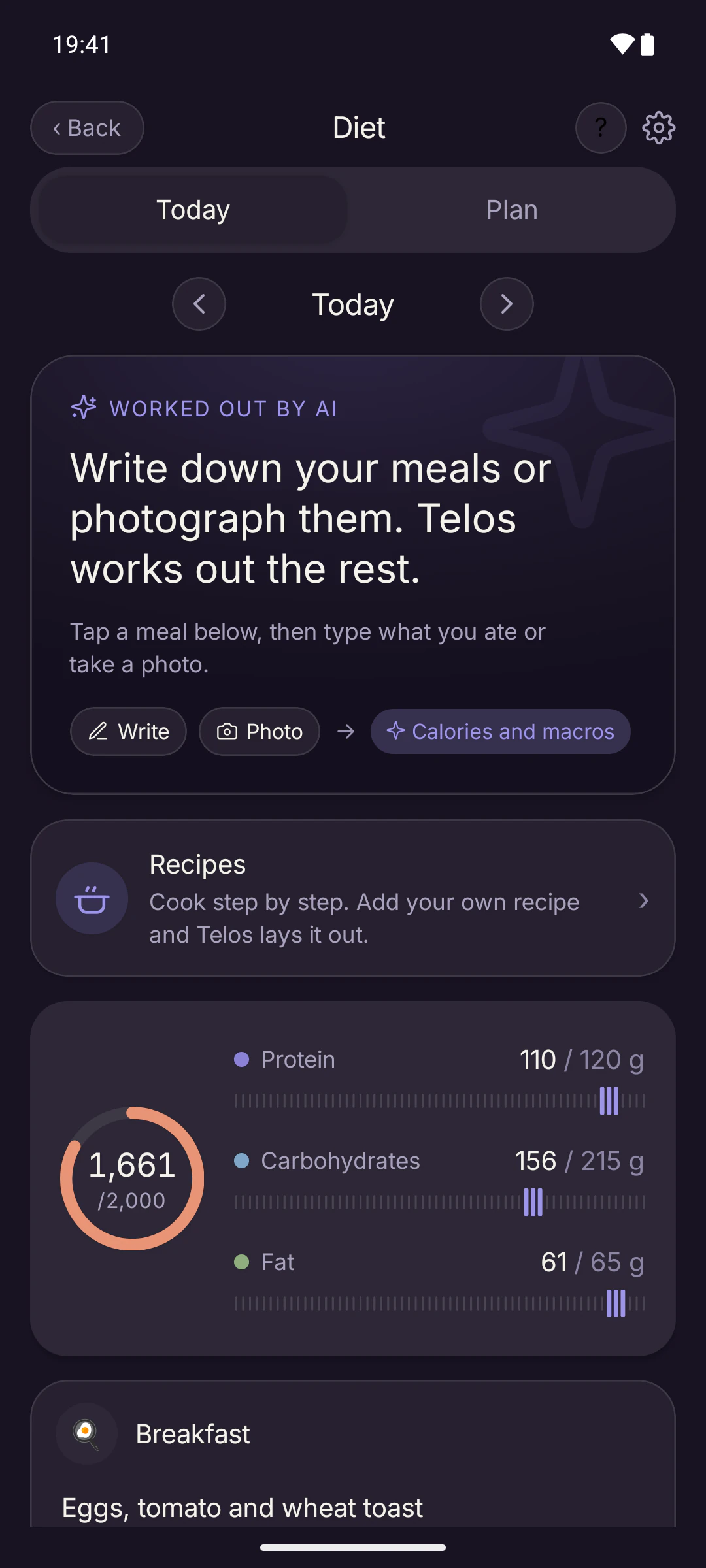
Diet screen: a “Write down your meals or photograph them” card, a ring showing 1,661 of 2,000 calories, and protein, carb and fat bars.

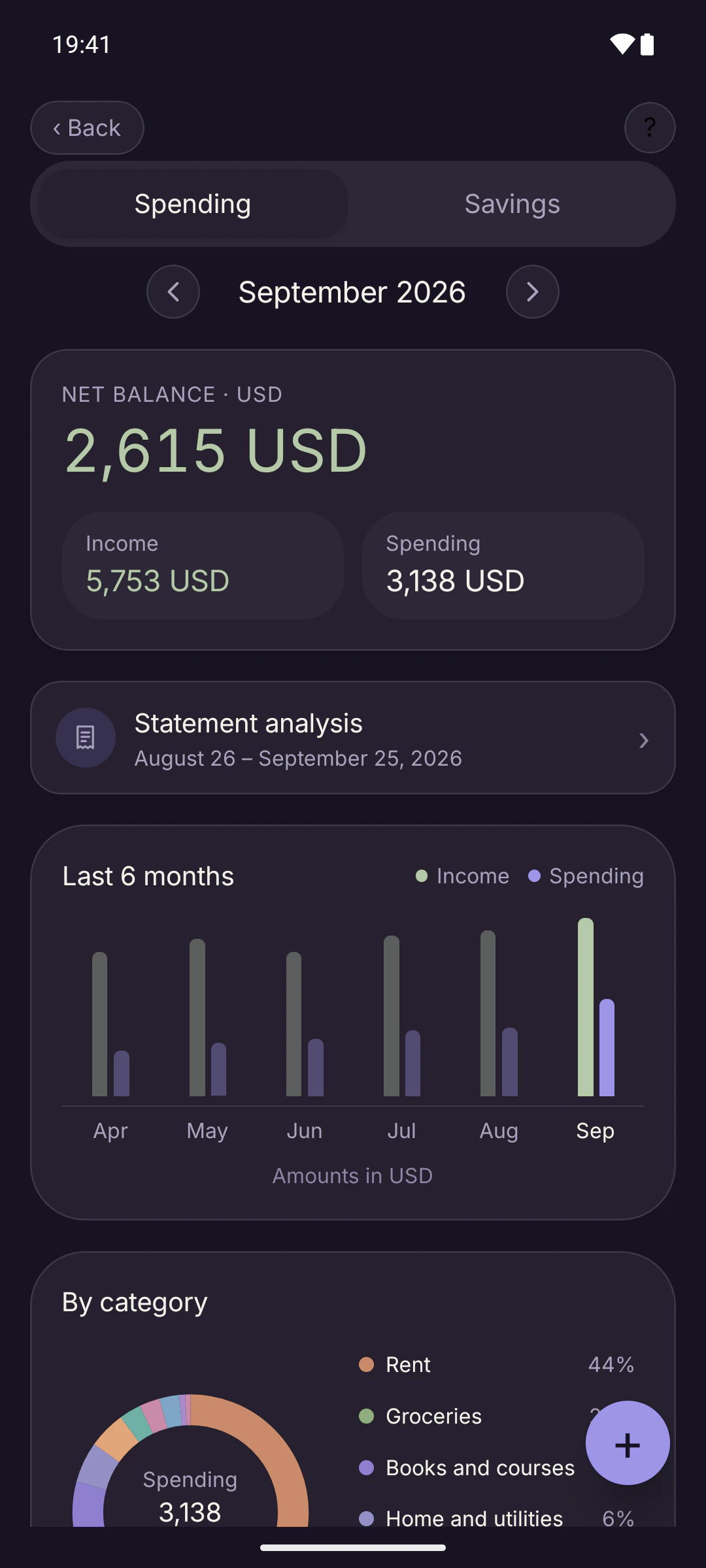
Spending: Income, spending and savings together.

See the month's net balance, the last six months and your categories. Recurring items like rent and salary show up every month on their own.

  • Currencies never get mixed. No made-up exchange rates.
  • Add a bank statement and AI pulls out a spending summary.
Spending screen: September 2026, a net balance of 2,615 USD, income and spending tiles, statement analysis and a six-month bar chart.

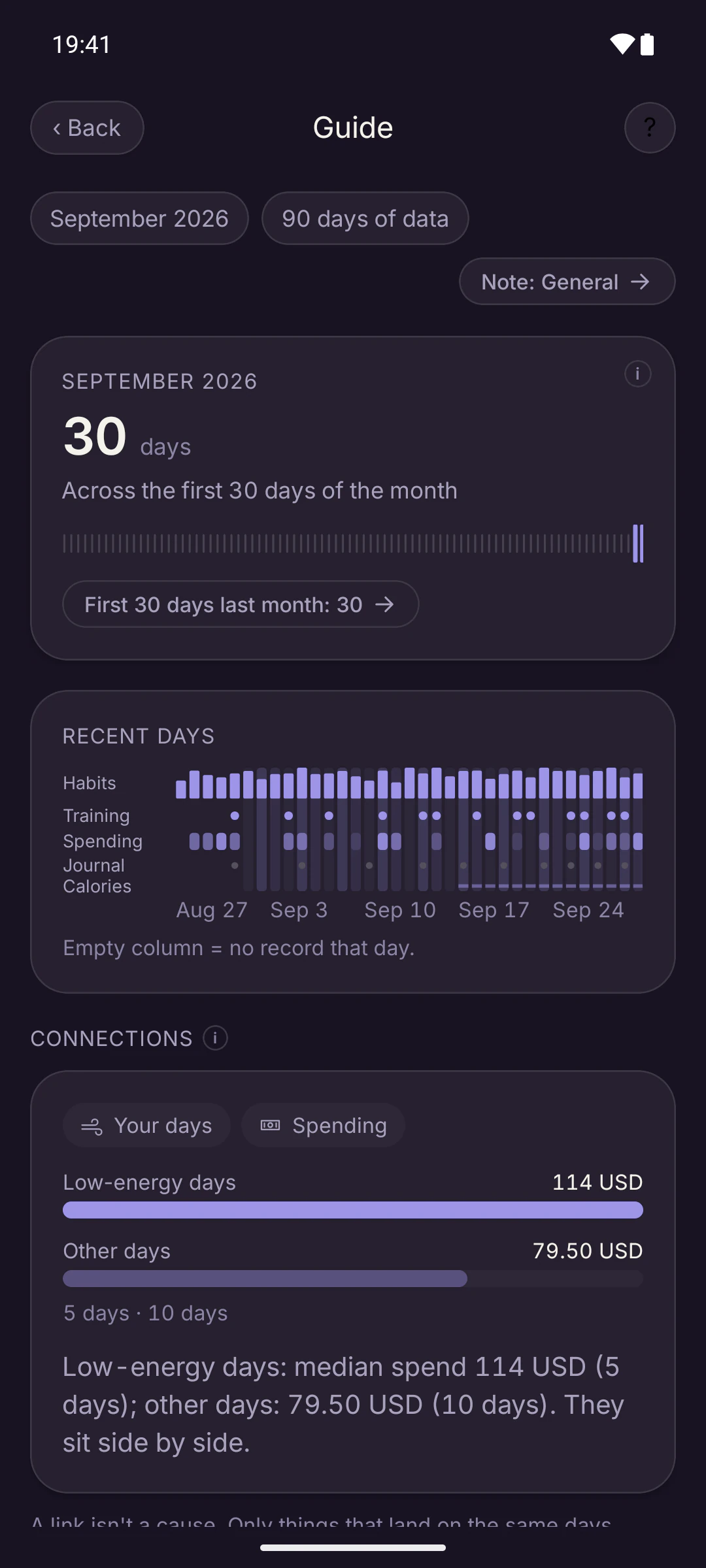
Guide: Not a report card. A calm look back.

The Guide shows your month in numbers: how many days you showed up, what changed when your energy was low. If you like, it adds a short note on top.

  • Numbers and charts are drawn from your own records.
  • It never compares you with anyone.
  • It shows connections and doesn't invent causes.
Guide screen: September 2026, a count showing activity on all 30 days, a strip of recent days across modules, and a connection between low-energy days and spending.

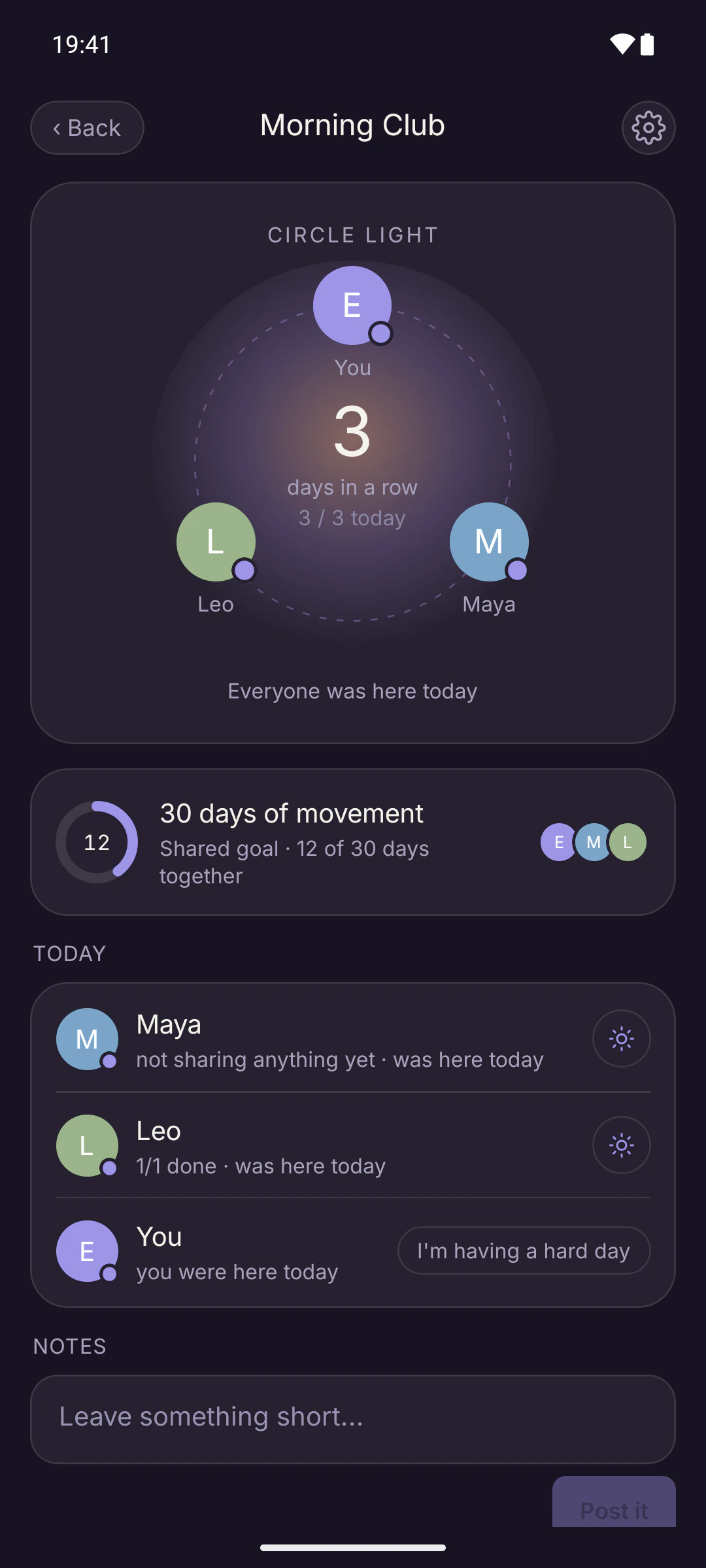
Together: Grow together. Nobody competes.

One invite link builds a bond with your partner, a friend or your coach.

Together screen: the “Morning Club” bond, three people on a ring with a shared streak in the middle, a 30-day shared movement goal and a list of who was here today.
  • You choose what to share, item by item. People in the bond see which days you stopped by and what you chose to share.
  • Nobody is ranked or compared. On a hard day, you can quietly say so.
  • A separate coaching bond for trainers and their clients.

IN BRIEF

The rest is just as calm.

The small pieces that sit next to the big ones.

  • Goals and quit counter

    Time-bound goals, progress rings, reflection notes. Quitting counts as a goal too: see the time passed and the money saved. A slip comes with no blame, and your longest streak stays on record.

  • Journal

    Capture the day in your own words. You can hide your journal from the screen.

    • Text
    • Photos
    • Voice notes
    • Mood
  • Focus and breathing

    A focus timer. To breathe, press and hold the light; the screen keeps no score.

  • Widgets and Live Activities

    A summary of your day on your home screen, on Android and iOS 17 and later. Live Activities on iOS 17 and later too.

  • Reminders and app lock

    Reminders at the time you pick; set quiet hours and they wait until those hours pass. Lock it with Face ID or your fingerprint.

  • Seven languages, two themes

    Türkçe, English, Deutsch, Français, Español, Português and 日本語. Light and dark themes.

AI

AI, only when you ask.

The AI doesn't run in the background or scan your data on its own. It works when you ask and goes quiet when it's done.

You can always correct its estimates. A plan it suggests is never set up until you approve it.

You can try every feature for free, and some free allowances renew each week or month. Premium gives you much wider use. A request goes to Google for processing only when you use that feature. Your journal text is never sent unless you turn that on.

  • Calories and macros from a meal photo

    Snap your plate or type what you ate; see the estimate and adjust it if you like.

  • Step-by-step cooking from a recipe you paste

    Paste a recipe from anywhere and it sorts it into ingredients and steps.

  • A workout program from a few words

    Type “three days a week, at home, with dumbbells” and get a weekly draft.

  • A spending summary from a bank statement

    Add your statement and see a summary sorted into categories.

  • A monthly Guide note

    A short, calm monthly summary of your own data.

  • Ask Telos

    Helps you set up habits, goals and plans. It shows the plan first, and you tap “Set up”.

PRIVACY

Your data is yours. Never sold, never rented.

An app that doesn't sell ads has no reason to let anyone track you. Here is the short version; the full one is in the privacy policy.

STORAGE
Your data is stored in the European Union (Ireland).When you use an AI feature, that request goes to Google. To deliver notifications, your notification token goes to Expo.
NONE OF THESE
Ads, advertising ID, location tracking, third-party analytics.Your data is never sold or rented.
SECURITY
Connections are encrypted with HTTPS.You can lock the app with Face ID or your fingerprint.
HEALTH
Steps, sleep and active energy are only read, and only on your device.Apple Health and Health Connect data is never sent to Telos servers.
JOURNAL
Your journal text doesn't go to AI unless you turn that on.This setting is off by default.
SHARING
In Together, you choose what's visible, item by item.People in the bond see which days you stopped by and what you chose to share.
EXPORT
Settings, Privacy and Data, Download your data. Get a copy of your data whenever you like.
DELETION
Settings, Account, Delete account. Deletion is immediate and permanent. It can't be undone.

PRICING

Everything you do by hand is free.

Downloading is free. What you pay for is AI doing more of the work for you.

FREE

Everything, by hand.

Download it, set it up, use it as much as you like.

  • Habits, goals, quit counter and journal
  • Spending, plan, fitness, diet, lists and reading
  • Together bonds, widgets and reminders
  • Try every AI feature for free

PREMIUM

More room for AI.

An in-app subscription.

  • Much wider use of photo calories, recipes, workout programs and statement summaries
  • More Guide notes and more Ask Telos conversations
  • Manage it from your store account and cancel anytime

Prices vary by country and store; you'll see the current price in the app.

FAQ

Things people ask.

If your question isn't here, just write.

Is Telos free?
Downloading Telos and every feature you use by hand are free. You can try the AI features for free; for wider use there's an in-app Premium subscription. Prices vary by country and store.
Is it on Android?
The Android version is in Google Play's release review. Once it's live, the Google Play button on this page will take you straight to the store. The iPhone version is on the App Store now.
Can I use it on the web?
You can also create an account and log in on the web. The main experience is the mobile app; the web version is more limited.
Where is my data stored?
In the European Union (Ireland). Connections are encrypted with HTTPS. When you use an AI feature, that request goes to Google for processing. To deliver notifications, your notification token goes to Expo. Your data is never sold or rented. The details are in the privacy policy.
How do I delete my account?
In the app, go to Settings , Account , Delete account. Deletion is immediate and permanent and can't be undone. If you can't get into the app, follow the steps on the account deletion page.
Can I export my data?
Yes. In the app, go to Settings , Privacy and Data , Download your data. You get a copy of your records as a file.
Which languages does it support?
Türkçe, English, Deutsch, Français, Español, Português and 日本語. You can switch languages in the app's settings.
Are there ads or tracking?
No. There are no ads, no advertising ID, no location tracking and no third-party analytics. The simple usage counts kept to improve the app stay on Telos's own server.
Does my health data go to Telos?
No. Steps, sleep and active energy from Apple Health or Health Connect are used on your device only, and only read.
How do I get in touch?
Write to support@telos.onl or visit the support page. Telos is made by a single developer, so a reply can take a few business days.

A small, calm light for today.

Download Telos and set up the rest at your own pace.

Download for iPhoneApp StoreGoogle Play: Coming soon

Already have an account? Log in